RecHound now supports accruals!
You can now analyse, draft and post accruals in just a couple of minutes, and without the need for spreadsheets. This saves you time whilst also providing full end-to-end governance around the process.
It's the largest feature we've designed since transaction clearing, and it took around six months of prototyping and conversations with accountants and bookkeepers to settle on the right approach.
How it works
The workflow we have designed covers five things:
- Reference your P&L, prior accruals and accrual schedules in one place
- Determine what needs to be accrued
- Confirm what your P&L will look like before you post
- Post the journal within RecHound
- Save the accruals as a supporting item for your balance sheet reconciliation
P&L view
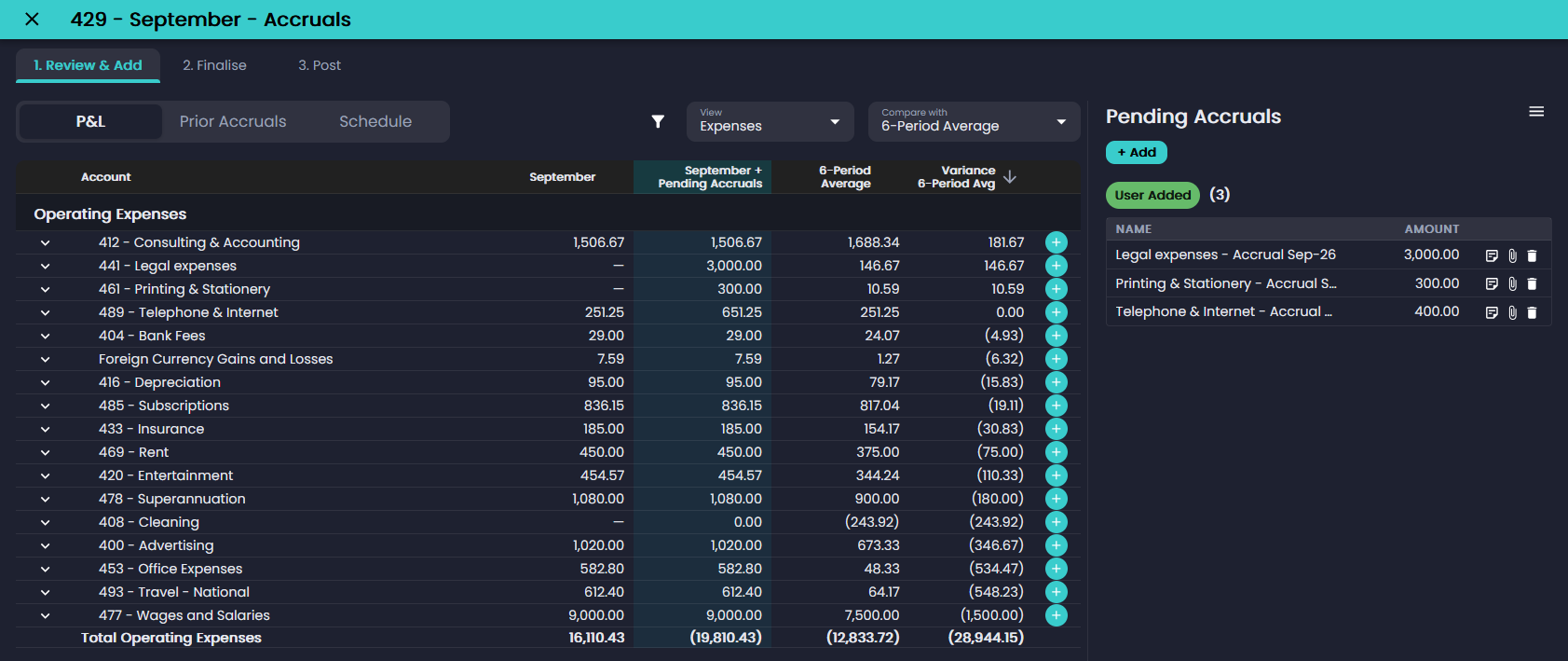
The P&L view pulls your live P&L from Xero. You can compare the current period against the prior period, a 3 or 6 period average, or several periods side by side, with a variance column alongside.
An accrual can be added directly from any P&L line, with the expense account pre-filled. A Current + Pending Accruals column shows the P&L as it will look once your accruals are posted. Nothing is sent to Xero until you post.
Prior accruals
The Prior Accruals view lists accruals from earlier periods, up to 12 periods back. Items can be re-accrued individually or in bulk, with amounts adjusted before adding. Notes and attachments carry forward with each item.
Recurring schedules
Monthly and quarterly accruals can be set up as schedules. Scheduled accruals are added to each period's list automatically until the schedule ends. A single period can be skipped without changing the schedule.
Posting to Xero
RecHound builds the accrual journal and its reversing journal and posts both to Xero, or saves them as drafts. Journals reverse by default, but you can turn this off. The reversal is posted as a separate journal dated on the first date of the following period.
Support and audit trail
The accruals total is checked against the account balance, and the list can be saved to the work paper as a supporting item. It's included in the Audit Report and Excel export.
Each accrual records its name, amount, contact, tracking, notes, attachments and source (schedule, prior period, user added or recommended). Once the work paper moves to review, the accruals record is locked.
Getting started
- Go to Settings → Accruals and nominate your accruals account or accounts.
- Optionally, add recurring accruals as schedules.
- Open the work paper for your accruals account and select View Accruals.
You can read more on the Accruals feature page. The Accruals user guide also covers each view in detail, along with an FAQ.
If you're not yet using RecHound, you can start a free 30-day trial — no credit card required!
Thanks to all those who have helped us build this awesome feature. We're looking forward to building more features that aid in the month-end process!
Any questions or feedback, feel free to reach out any time at alex@rechound.com.
Thanks everyone!
— Alex
Ready to fix month-end for good?
Try RecHound free — no credit card required.